Register people. Identify faces live.
Enroll people. Identify faces in real time.
Workers • Camera • Live • Remote
Sentra is a desktop application for people registration and real-time facial identification from a camera source (USB or network stream). It includes a Live mode for on-screen tracking and a LAN-only remote panel so you can check status from a phone or PC on the same network.
APP: DESKTOP
INPUT: USB / RTSP / HTTP
MODE: LIVE FACE ID
REMOTE: LAN WEB PANEL
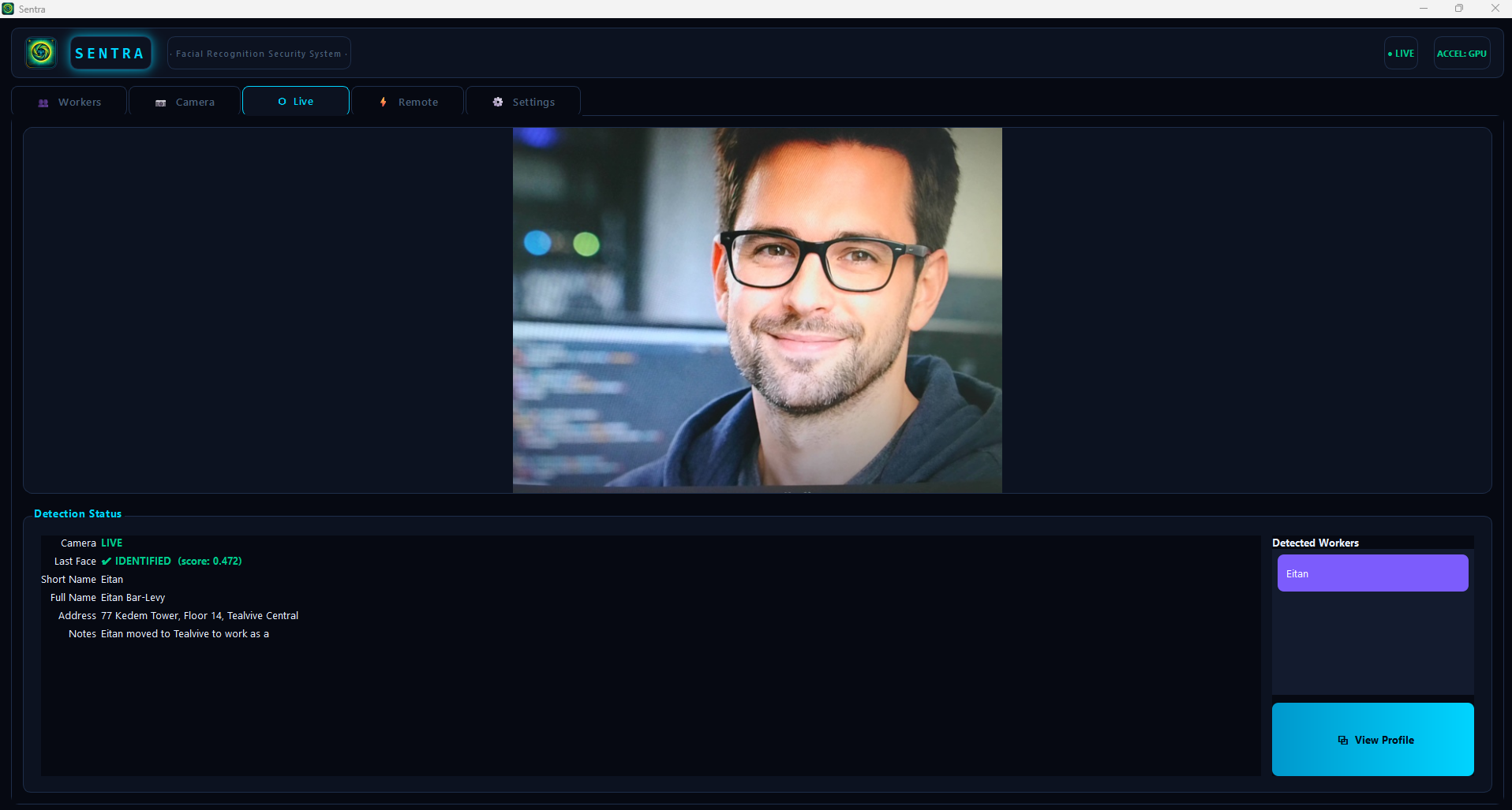
Plain scope: Sentra is a local tool for identity lookup on a controlled camera feed. It shows IDENTIFIED (with a score) for known profiles and UNKNOWN when a face does not match your registry.
It requires Terms & Conditions acceptance and a license check at startup—if either fails, the app does not launch.
Remote access is optional and intended for use inside your LAN (password required).
GPU acceleration (optional): To run Sentra with GPU providers, the machine where it is installed must have:
- An NVIDIA GPU with CUDA 13.1 support
- NVIDIA drivers installed
- CUDA 13.1 + cuBLAS 13 + cuFFT 12 resolvable (via CUDA_PATH or PATH)
- cuDNN 9 resolvable (via CUDNN_HOME/CUDNN_PATH or PATH)
What happens when you open Sentra
- Terms & Conditions appear first and must be accepted.
- Then Sentra runs a license check. Fail either step and the app will not start.
- The main window header shows ONLINE/OFFLINE plus an accelerator indicator (from the user’s point of view, it’s just a performance/availability status).
Design intent: predictable, local operation on your own hardware (no cloud login).
Main areas (tabs)
- Workers: registry, profiles, and enrollment samples.
- Camera: connect and configure the video source.
- Live: real-time video with face tracking and identification overlays.
- Remote: LAN web panel with password access.
- Settings: thresholds and maintenance (reload models, detector threshold, max faces per frame, prefer closest faces, match threshold).
Reality check: face matching is probabilistic. Treat scores as signals, not certainty.
Workers: profiles and enrollment
- Searchable table with ID, Short Name, and Full Name.
- Short Name is required to save a profile properly.
- Attach face samples via Add Photo File… (import images) or Capture from Camera (live capture when a face is detected and “ready to capture”).
- Import Photos… can batch-import and optionally create profiles from detected faces (you still need to fill Short Name).
- You can delete a worker with confirmation.
Destructive option: Wipe ALL Data deletes profiles, facial data, and remote credentials. It is irreversible.
Camera: connect a video source
- USB: auto-scan camera indexes (0–8) and select a device.
- Network: enter an RTSP or HTTP URL and Test Connection.
- Optional discovery for network cameras (ONVIF + LAN search) to help you find endpoints.
Expectation: if the stream is unstable or low-light, identification quality will degrade.
Live: real-time identification
- Shows the live feed and draws overlays (face box + landmarks) so you can see what is being tracked.
- Maintains Last Face status:
- none: “—”
- face seen but not matched: UNKNOWN
- matched: IDENTIFIED (score) + profile fields
- When multiple faces are present, Sentra selects a target to avoid chaotic switching; you can manually lock a target by clicking it.
Remote: LAN web panel (password required)
- Optional local server on a configurable port.
- No password, no access: the panel refuses connections until a password is set in the app.
- Shows Camera Online/Offline, Last Face, a “Live” frame, and a Profile block when identified.
- Sentra displays the panel URL and a QR code for quick opening on a phone.
Security: this is intended for use inside your network. Exposing it to the internet is your risk.
GUI Preview
Click image to play video